Maintenance, support and FAQ

Home · Reports, AI Log and traceability · Glossary

AI Log investigation cues

Useful surfaces for operation

The following observation points are confirmed in the application:

  • notifications in the top bar;
  • health indicator in the top bar;
  • signals in the project workspace;
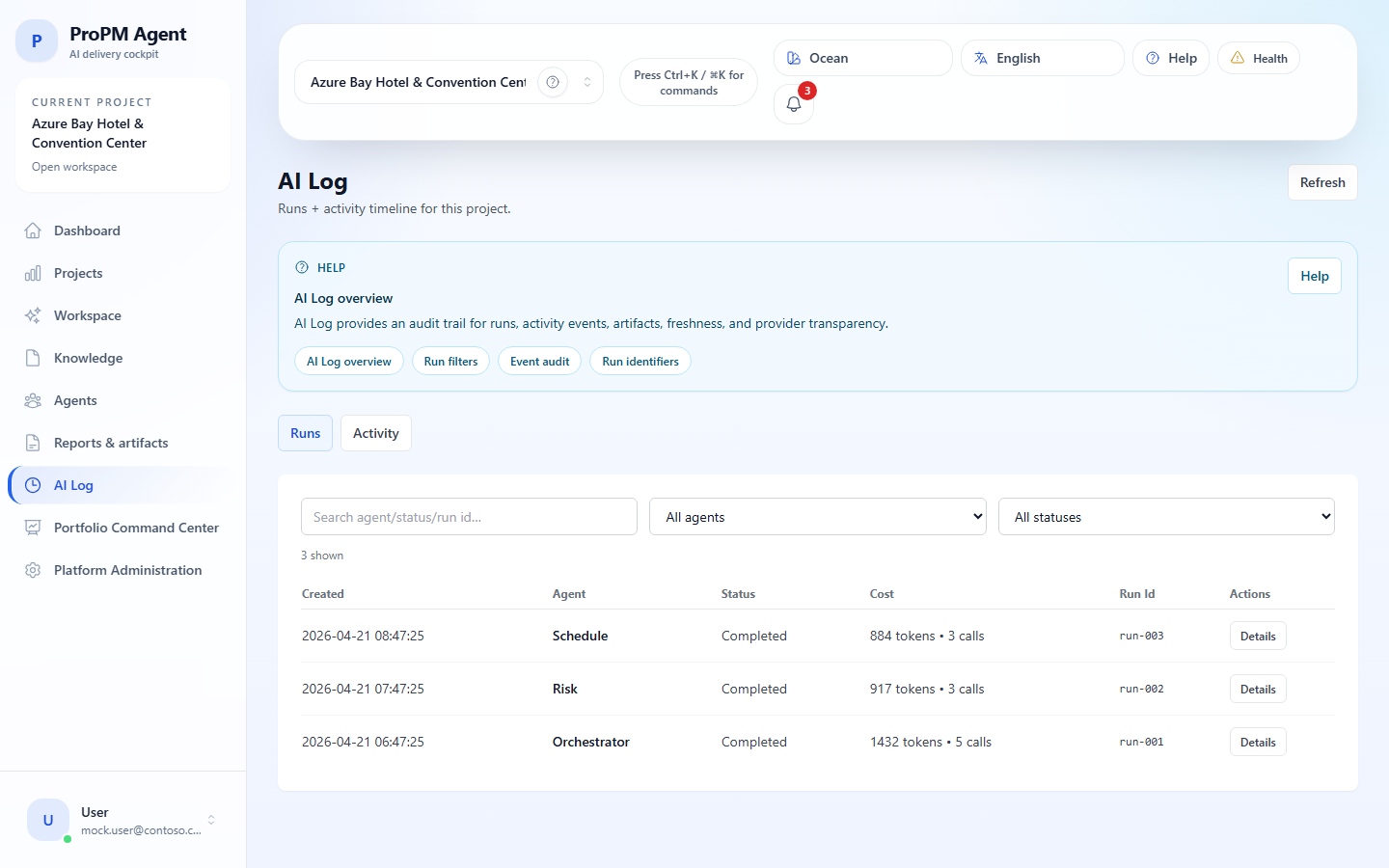
  • AI Log for runs and activity;
  • Audit / activity in platform administration.

Quick verification procedure

  1. verify that the correct project is active;
  2. distinguish empty state, read‑only, access denied or message displayed;
  3. open the AI Log if the subject concerns an agent, a result or an artifact;
  4. keep the Trace ID and, if visible, the Context snapshot ID or the Structured output ID;
  5. check rights, integrations, entitlements and seats if access or execution is blocked.

Quick references by situation

Observed situationFirst‑level surfaceNext step
Abnormal Microsoft login or returnGetting Startedcheck Entra, tenant, redirectUri and seats
No project visible after loginProjects / project selectorAccess control or add account to project
Dubious agent response, artifact or publicationAI LogRunsActivity, then Reports & artifacts
Inconsistent import or searchKnowledge and import historyProject integrations, then Platform administration
External action visible but blockedActions & approvalsProject integrations, then Platform administration

Quick checklists

Access to confirm

Check the URL, tenant, guest account if using guest, the actually configured redirectUri, and seat availability if the plan consumes one.

Page visible but not editable

You are probably in read‑only mode. Verify your role before concluding a permission restriction.

Document visible but not searchable

Start by checking the document status (Indexed, Ingesting, Failed), import history, page refresh, and the search Trace ID if a call failed.

Import from a grayed or missing source

The most useful checks are: unvalidated provider, missing project binding, blocking entitlement, insufficient permission, or health status to confirm.

Action visible but not executable

Check the compatible connector, project binding, required approval, user role and applicable policy.

Voice unavailable

The voice depends on the browser. Try another browser, check microphone permissions, and use text input if voice recognition is not supported.

Data to provide to support

ElementWhy it’s useful
Deployment URLIdentify the environment in question
Project concernedReplay the context
Trace IDPrecisely locate the run or event
Context snapshot ID / Structured output IDLink a run, output and artifact
ScreenshotUnderstand the visible state at the time of blockage
Approximate timeCross‑reference the event with logs

FAQ — access and security

Why can I see an admin page but not modify it?

Because the product distinguishes read‑only and access denied. A page can be exposed for inspection without allowing modification.

Why does my Microsoft login succeed but access hasn’t yet worked as expected?

Check the tenant, account authorization, existence of an accessible project and seat availability if the plan requires one.

Why does my login succeed but no project appears?

This situation does not necessarily indicate an authentication issue. First check the project selector, then the Projects page. If the list remains empty, the account probably hasn’t yet been added to the correct project or lacks creation rights.

When should I invite an external account as a guest user?

When the account belongs to a different tenant than the one hosting the application. The account must then be invited to the target tenant, then authorized on the application or via the expected group.

How to quickly distinguish tenant, redirect URI, Entra client or seat?

Follow this order:

  1. if Microsoft fails before returning to the application, suspect tenant, clientId or redirectUri first;
  2. if the login succeeds but the application remains blocked, then check seats and project access;
  3. if only a specific surface remains locked, the issue is often on the role or permission side rather than authentication.

FAQ — availability, runtime and connectivity

How to read the health panel when some pages are still loading?

Because authentication may remain valid while an API component or provider still requires an availability check. First note the status shown in the health indicator, then proceed to Interface and navigation for panel reading and Portfolio and technical administration if the doubt concerns the provider or admin integration.

What to do if login succeeds, a project is visible, but runs do not start?

Check in this order: active project, health indicator, assumed operational AI provider, possible entitlement, then AI Log to see if a run has at least been created. If the provider remains suspect, proceed to Portfolio and technical administration.

FAQ — project, workspace and agents

When should I use Workspace instead of Agents?

Use Workspace to configure and drive the project; use Agents to converse with an agent and produce a structured output.

Where is the chat history stored?

The visible history is local to the browser. It is not a shared central archive.

What is local to the browser and what is shared in the platform?

In the currently observed state:

  • chat continuity is saved locally, per project + agent pair, in the current browser;
  • the remembered active project also depends on the browser and sometimes the local session;
  • other browser-local conveniences include the interface language, the theme, the recent-project list, the read/cleared state of the notification center, and some saved table or view preferences;
  • documents, imports, artifacts, approvals, published reports, project notifications, signals, digests, drafts, and governed actions belong to the shared platform.

It is therefore normal for chat history to disappear when changing browser or machine while governed project objects remain visible to other authorized users.

What exactly does All projects mean?

All projects is a custom-agent scope, not a single project and not a portfolio view. It means a custom agent can remain visible across all projects accessible by the same account. Each run still executes in the active project at chat time.

Why does a custom agent not appear in another project?

First check its scope. A Project‑only agent remains limited to the current project. If the environment exposes an All‑projects agent, it must also be consulted with the same account in a project that account has access to.

Is chat history retained by project, by agent or only by browser?

The observed continuity is local to the browser and tied to the project + agent pair. It is therefore neither global to the entire tenant nor automatically shared between browsers.

Which browsers or permissions should be checked first for voice?

Start with browser support for SpeechRecognition / webkitSpeechRecognition, then check microphone access permission. If the button remains unavailable or recognition fails, revert to text input without blocking the project flow.

Why does voice not appear in every environment?

Because this capability depends on the browser and its support for speech recognition. Voice input is optional: its absence does not block the nominal workflow, which remains text input in Agents.

Why do Workspace, Knowledge or AI Log look empty?

Start by checking whether an active project exists. In the current application state, these surfaces can show a normal empty state as long as no project is selected.

If a project is already active, then distinguish a normal empty state from a real lack of data: new project, no run, no document, no artifact or an active filter.

Why is Reports & artifacts empty?

The most frequent causes are:

  • no artifact or PM Doc has been created yet;
  • the run stayed at the structured output stage;
  • the wrong project or a filter hides the rows;
  • the environment does not contain the same demo data as other screenshots or tests.

Why is a document visible in the list but not yet searchable?

Because it may still be in Ingesting state or waiting for the end of the indexing pipeline.

What do source label and source system mean?

These two fields help you judge provenance quickly:

  • source label usually identifies the visible provider or ingestion origin for the item (manual, SharePoint, ADF, Blob, Confluence, Jira, etc.);
  • source system helps you recognize the human-readable system or workstream behind that evidence (Knowledge, Schedule, Finance, Operations, etc.).

Use both together when you need to arbitrate a snippet without reopening the full configuration.

Why might an import appear finished while some documents are not yet searchable?

Because visible ingestion does not always mean all indexing is finished. Check the document status (Indexed, Ingesting, Failed), then re‑run search when the document is actually indexed.

Why is a document Indexed while a proof remains unavailable in a structured output?

The document may be present in Knowledge while the proof linked to the run could not be confirmed, reopened or stabilized at the time of generation. Refer to Structured outputs, evidence and freshness, then check the run in Reports, AI Log and traceability if needed.

What do the freshness badges in search and evidence mean?

They indicate the temporal confidence state of the source: fresh, aging, stale, conflicting or unavailable. Use them as a signal for re‑review before publication, not as a cosmetic detail.

What is the difference between Trace ID, Context snapshot ID and Structured output ID?

  • Trace ID: main tracking identifier to locate a run or event;
  • Context snapshot ID: capture of the document/project context used during the run;
  • Structured output ID: identifier of the actually produced structured output.

In day-to-day reading, keep in mind that Run ID is the most practical on-screen handle, while Trace ID becomes especially useful for support, audit, and cross-service correlation.

FAQ — AI outputs and AI Log

What is the difference between Runs and Activity?

Runs shows agent executions and their metadata; Activity shows a timeline of project events and the raw payload associated.

How to know which AI provider was actually used?

Open the run details in AI Log and read Effective AI Provider. This is the reference value for that run.

Why do Validate and Test not always guarantee this provider will actually be used?

Because Validate and Test mostly check administrative consistency and connectivity of the configuration. The provider actually used on a given run remains the one resolved at runtime and exposed in the AI Log.

A run is visible in Runs, but no clear follow‑up appears in Activity. What to do?

This case often means the run existed but no draft, artifact, notification or downstream action has yet been created, or you’re not opening the correct project / filter in Activity. Continue the investigation via Reports, AI Log and traceability following the order diff / lineage / Runs / Activity.

How should I read the Cost field?

Treat Cost as a runtime-transparency cue: tokens and calls are mainly useful for investigation, support, and understanding usage, not as a business approval signal by themselves. If you need a cross-project budget or usage pressure signal, open cost_pressure in Portfolio instead.

What should I actually do with Confidence and Source freshness?

  • Confidence = review cue, not proof by itself;
  • Source freshness = how current the cited evidence still is;
  • if either looks weak, old, conflicting, or unavailable, go back to the evidence, the run, and the lineage before sharing externally.

FAQ — reports, artifacts and governance

What is the difference between PM Doc, artifact and artifact version?

The artifact is the governed object, the artifact version is its historic state, and the PM Doc is the project document reviewed, edited or published from that object.

Why is an action visible but not executable?

Check rights, connector, project binding, governance policy and required approval. See also Governance, decisions and actions.

When should I Approve, Publish or Add to knowledge?

  • Approve validates a draft artifact still in draft;
  • Publish triggers governed distribution to a target or output format;
  • Add to knowledge reinjects a reread document into project search.

These three actions are not interchangeable.

How to arbitrate a conflicting proof before publication?

Reopen contradictory sources, compare snippet, date, provenance and freshness, then document the arbitration in the artifact, review note or governance flow. If needed, align everything with the AI Log.

Why does a notification draft remain held or never go to an external channel?

In the observed interface, in_app is the most direct path. External channels may remain in held / draft until governed distribution, policy, connector or approval are met. Follow the chain in Governance, decisions and actions: signal, possible digest, draft, policy, connector, then approval.

Why does an action remain pending approval or approved without visible execution?

  • pending approval means the approval has not yet been granted;
  • approved means the approval exists, but not necessarily that execution has already occurred.

Confirm the downstream step in Actions & approvals, then in Activity. If needed, use the method described in Reports, AI Log and traceability.

Why is an integration available at platform level but locked in my project?

Because a platform technical definition alone is not enough. You still need a valid project binding, adequate permissions, a compatible policy, acceptable health status and, if applicable, the corresponding entitlement.

FAQ — portfolio and administration

Why does demo data not always match the documentation exactly?

Live environments can vary. Some projects do not always expose the same seeded documents, seeded reports or search examples shown in the documentation or in other tests.

Why does the portfolio not return any project or outlier?

Several readings can be normal:

  • no accessible project has been loaded;
  • no project or no signal is currently selected;
  • the comparison returned no usable project summaries;
  • some signals are unavailable because evidence is missing;
  • no project exceeds the active overall outlier threshold.

A quiet portfolio can therefore come from restrictive selection, limited evidence, or a genuinely stable situation.

Are there implicit Portfolio presets?

No. The observed interface mainly provides default values, a Reset defaults action, and saved cohorts. The defaults are a safe starting point, not a mandatory model. Some demos may also show a seeded cohort, but that content varies by environment.

How to release or reassign a seat?

This is done from Platform administration by an authorized profile. Removal frees capacity for later reallocation, subject to plan posture and withdrawal window.

What does “Validate succeeded but Test failed” mean in AI Provider settings?

The administrative configuration appears coherent, but real connectivity or remote access has not yet passed. Check endpoint, secret or auth, provider accessibility and network constraints, then follow the sequence described in Portfolio and technical administration.

Why is my provider visible but never Operational?

A provider can be configured or even validated without having passed the full chain Configuration → Validation → Test → Activate. Also check entitlement, allowed providers and overall readiness before considering it usable.

What to do if no Azure OpenAI deployment appears in AI Provider settings?

This usually means no deployment is visible in the configured Azure OpenAI resource, or discovery cannot succeed with the current parameters. Check endpoint, auth, API version and actual deployments on the Azure side, then proceed to detailed control in Portfolio and technical administration.

Why is the AI provider visible but not modifiable or usable?

The provider may be visible in read‑only but its modification remains reserved for an admin role. Its usage may also be limited by plan, allowed providers, entitlement or runtime resolution of the effective provider.

Next