AI प्रदाता और प्लेटफ़ॉर्म एकीकरण
मुखपृष्ठ · AI providers और platform integrations
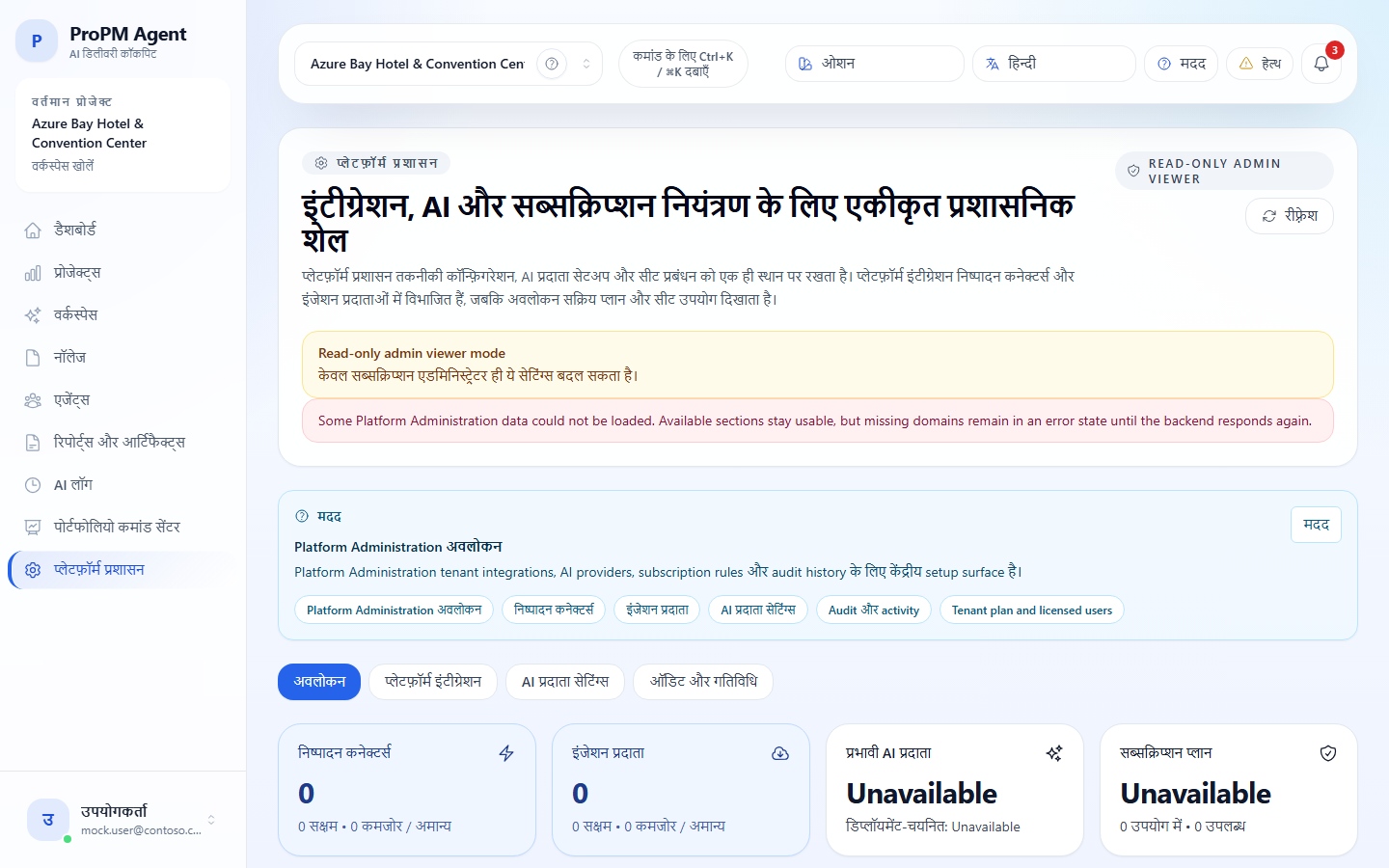
उद्देश्य
यह पेज platform level पर ProPM Agent की technical preparation को cover करता है:
- connectors और ingestion providers के लिए Platform integrations;
- runtime model providers के लिए AI provider settings;
- readiness, validation, tests, health और project binding rules।
इसे इस सवाल के लिए उपयोग करें: क्या projects उपयोग शुरू करने से पहले platform organization के लिए सही तरह तैयार है?
दिखाई देने वाले administration sections
| Section | भूमिका |
|---|---|
| Overview | overall preparation state का summary |
| Platform integrations | connectors और ingestion providers की technical definitions |
| AI provider settings | AI provider की configuration, validation, test और activation |
| Tenant plan and licensed users | Marketplace plan, ordered seats, supplemental licenses और licensed users |
| Audit / activity | administrative actions का history |
Marketplace plan, licenses और application image rollout के लिए Tenant plan, licensed users और app updates देखें।
Platform integrations vs project integrations
Product की core rule है:
- platform level तय करता है कि technically क्या मौजूद है;
- project level तय करता है कि किसी project में वास्तव में क्या उपयोग होगा;
- governance तय करती है कि tool से कौन act कर सकता है।
| Responsibility | Platform Administration में रखा जाता है | Project integrations में दिखता है |
|---|---|---|
| Technical setup | tenant URLs, authentication strategy, API keys, secret references, scopes और source/target definitions | read-only readiness, health और block reasons |
| Operational binding | enterprise connector/provider enable या disable करना और technical health validate करना | project availability के लिए Bind to project, Validate binding और Disable |
| User guidance | admin audit, validation history और tenant-scoped configuration | context links जैसे Open Platform Administration और Open Knowledge imports |
Connector families का detail कनेक्टर्स और एकीकरण में देखें।
Validation और security rules
Platform validations provider-specific requirements लागू करती हैं:
- mandatory fields;
- compatible authentication strategy;
- जहाँ आवश्यक हो HTTPS URLs;
- valid SFTP port;
- explicit source या target;
- connectivity probe केवल तब जब administrator या platform configuration ने enable किया हो।
Secrets, keys और sensitive references केवल उसी platform configuration में रहें जो इस उद्देश्य के लिए बनी है। उन्हें note, action payload या project users को दिखने वाले description में न रखें।
Preparation और blocking causes
Integration block हो सकती है:
- policy के कारण;
- permission के कारण;
- check की जाने वाली health के कारण;
- missing platform definition के कारण;
- incomplete provider-specific configuration या validation के कारण;
- project binding न खुलने के कारण।
Recommended verification circuit:
- project-side block दोबारा पढ़ें;
- Platform Administration खोलें;
- connector या provider की technical definition verify करें;
- project पर वापस जाएँ और binding तथा authorized use confirm करें।
AI provider families
Product में दिखाई देने वाली provider families में शामिल हैं:
- OpenRouter;
- OpenAI-compatible;
- OpenAI;
- Azure OpenAI.
| Provider | कब चुनें | आम तौर पर क्या पूरा करना होता है |
|---|---|---|
| OpenRouter | जब एक connection से multiple model families compare करनी हों | Base URL, key, default model |
| OpenAI-compatible | जब organization gateway या compatible endpoint उपयोग करती हो | exact endpoint, auth, key या secret, expected model |
| OpenAI | जब organization OpenAI directly उपयोग करती हो | URL, key या secret, default model |
| Azure OpenAI | जब organization Azure-centered हो और Azure OpenAI deployments चुनना चाहती हो | endpoint, API version, auth mode, LLM deployment name |
AI provider readiness
| Status | अर्थ |
|---|---|
| Configuration | fields saved हैं |
| Validation | configuration ने expected checks pass किए |
| Test | real connectivity verify हुई |
| Activate | provider admin configuration में activated है |
| Operational | provider usable माना जा सकता है |
Simple preparation flow:
- AI provider settings खोलें;
- desired provider चुनें;
- requested fields भरें;
- Save पर क्लिक करें;
- Validate पर क्लिक करें;
- Test पर क्लिक करें;
- Activate पर क्लिक करें;
- result AI Log में देखें।
Azure OpenAI specifics
Azure OpenAI के साथ अक्सर ये fields पूरी करनी होती हैं:
- Endpoint;
- API version;
- authentication mode;
- LLM deployment name;
- optional Embeddings deployment name.
Marketplace deployment के दौरान AI provider चुनने की जानकारी के लिए Azure Marketplace deployment देखें।
Effective provider vs deployment-selected provider
दो notions अलग रखें:
- Deployment-selected AI Provider: initial environment configuration में चुना गया provider;
- Effective AI Provider: किसी concrete run में runtime पर वास्तव में उपयोग हुआ provider।
Concrete run investigate करते समय effective value सबसे reliable reference है। यह AI Log में दिखती है और deployment-selected value से अलग हो सकती है।
याद रखने योग्य बातें
- platform level connectors और providers prepare करता है;
- project level उनका real use खोलता है;
- governance तय करती है कि कौन act कर सकता है;
- AI provider तभी ready है जब वह registered, validated, tested और activated हो;
- actual provider confirm करने के लिए AI Log reference रहता है।