Licenses, plans और updates
Azure Marketplace purchase, price और billing का source है। ProPM Agent detected capacity और users दिखाता है।
In-place application image update के लिए Deployment & Updates उपयोग करें। Plan change या existing data के साथ major update के लिए नया Marketplace deployment create करें और Attach existing ProPM data resources चुनें।
Counters
| Counter | अर्थ |
|---|---|
| Ordered seats | खरीदी गई capacity |
| Included seats | plan में included |
| Supplemental seats | अतिरिक्त खरीदी गई |
| Used seats | used licenses |
| Remaining seats | शेष licenses |
Licensed users manage करना
- Platform Administration खोलें।
- Tenant plan and licensed users खोलें।
- user list देखें।
- Release user केवल तब करें जब user को access की आवश्यकता न हो।
Refresh Marketplace plan
यह known information sync करता है। यह licenses नहीं खरीदता, plan नहीं बदलता और billing modify नहीं करता।
Existing data के साथ plan change या major update
यह flow तब use करें जब नई Marketplace Managed Application चाहिए लेकिन existing ProPM data रखना है।
- Azure Marketplace खोलें।
- Target plan चुनें।
- नया ProPM deployment create करें।
- Attach existing ProPM data resources select करें।
- Previous ProPM Managed Application की full Resource ID enter करें।
- Overrides empty रखें, जब तक support या architecture require न करे।
- Cutover, administration, CORS, monitoring, SQL password और VNet CIDR review करें।
- Review + create select करें।
Update screen 1 - Existing data attach करना
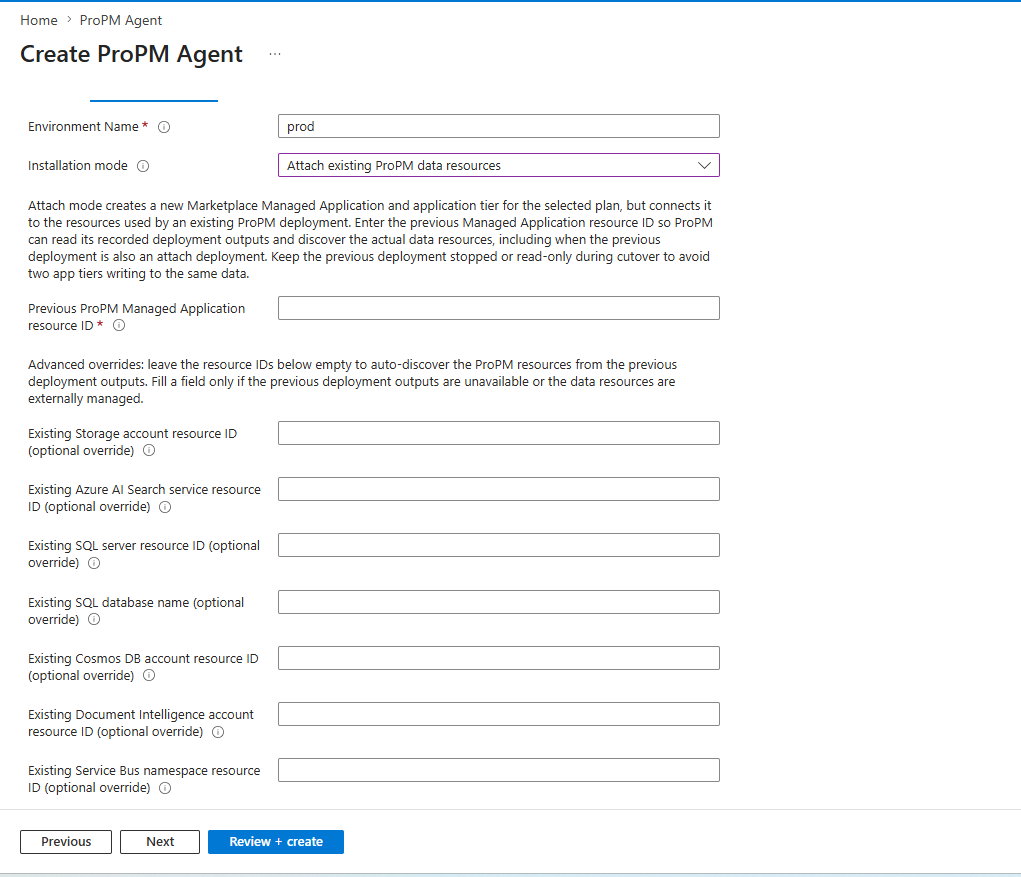
| Field | Required | क्या भरें | Recommendation |
|---|---|---|---|
| Environment Name | हाँ | Short environment name, जैसे prod, uat या test। | Stable, non-secret value use करें। |
| Installation mode | हाँ | Attach existing ProPM data resources। | New application tier बनाता है और existing data resources reuse करता है। |
| Previous ProPM Managed Application resource ID | हाँ | Previous ProPM Managed Application की full Azure Resource ID। | Properties से Id copy करें, सिर्फ names नहीं। |
| Existing Storage account resource ID (optional override) | नहीं | Existing Storage Account Resource ID। | Default में empty रखें। |
| Existing Azure AI Search service resource ID (optional override) | नहीं | Existing Azure AI Search service Resource ID। | Auto-discovery fail हो तभी भरें। |
| Existing SQL server resource ID (optional override) | नहीं | Existing SQL Server Resource ID। | Server identify करता है, database नहीं। |
| Existing SQL database name (optional override) | नहीं | Existing SQL database name। | Auto-discovery न हो तभी use करें। |
| Existing Cosmos DB account resource ID (optional override) | नहीं | Existing Cosmos DB account Resource ID। | Explicit need हो तभी भरें। |
| Existing Document Intelligence account resource ID (optional override) | नहीं | Existing Document Intelligence account Resource ID। | External या custom resource के लिए। |
| Existing Service Bus namespace resource ID (optional override) | नहीं | Existing Service Bus namespace Resource ID। | Default में empty रखें। |
| Previous | नहीं | Previous step पर लौटता है। | Deployment start नहीं करता। |
| Next | नहीं | Next step पर जाता है। | Required fields complete होने पर use करें। |
| Review + create | नहीं | Creation से पहले Azure validation। | अंत में use करें। |
Update screen 2 - Cutover और platform
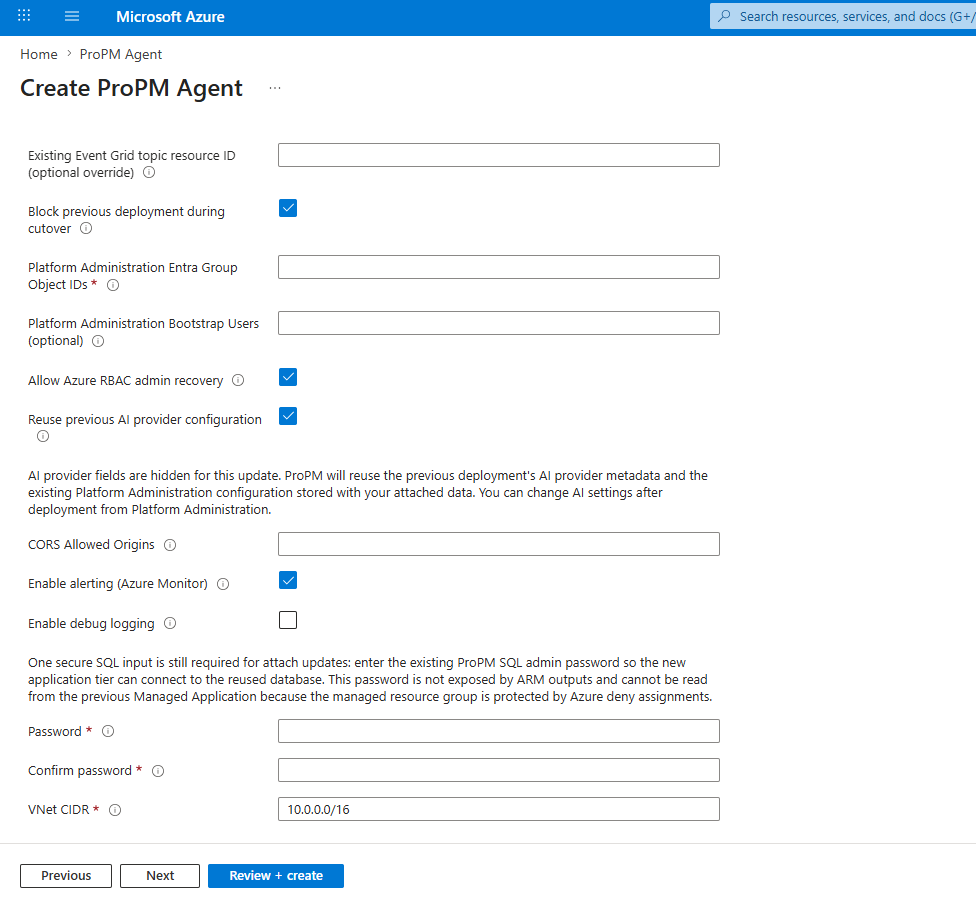
| Field | Required | क्या भरें | Recommendation |
|---|---|---|---|
| Existing Event Grid topic resource ID (optional override) | नहीं | Existing Event Grid topic Resource ID। | Auto-discovery fail हो तभी भरें। |
| Block previous deployment during cutover | नहीं, recommended | Validation के दौरान previous environment block करें। | Same data पर parallel writes रोकता है। |
| Platform Administration Entra Group Object IDs | हाँ | Platform admin Entra Group Object IDs। | Object IDs use करें, display names नहीं। |
| Platform Administration Bootstrap Users (optional) | नहीं | Bootstrap या recovery users। | Minimum रखें। |
| Allow Azure RBAC admin recovery | नहीं | Azure RBAC recovery। | Governance allow करे तो रखें। |
| Reuse previous AI provider configuration | Recommended | Previous AI configuration reuse करें। | AI fields hidden होते हैं; बाद में Platform Administration से बदलें। |
| CORS Allowed Origins | Scenario पर निर्भर | Additional web origins। | Needed न हों तो empty रखें। |
| Enable alerting (Azure Monitor) | नहीं | Azure Monitor alerts enable करें। | Production में recommended। |
| Enable debug logging | नहीं | Detailed logs enable करें। | Controlled diagnosis के लिए ही। |
| Password | हाँ | Existing ProPM SQL admin password। | Reused database से connect करने के लिए required। Secret की तरह handle करें। |
| Confirm password | हाँ | Password जैसा value। | Match होना चाहिए। |
| VNet CIDR | हाँ | Private range, जैसे 10.0.0.0/16। | Network team से validate करें और overlap avoid करें। |
Updates
Deployment & Updates को controlled window में चलाएँ और rollback के लिए support information रखें। इसे plan changes या existing data cutover के लिए उपयोग न करें।